Set up seat ranking and recommendations
Rank a venue plan's seats for best available on the Ranking tab, sign the ranking off, set each event's selling rules and the most seats an order takes, try an on-sale with the simulator, and see what buyers are offered.
Best available is what chooses seats for a buyer who asks for two tickets rather than tapping two seats. The venue says which of its seats are better, once, on the Ranking tab of a plan version. Each event then says how seats are sold, on its Selling rules. Buyers and Box Office staff see the suggestions that come out; nobody outside Backstage ever sees a seat's rank.
How best available chooses#
- Every seat has a quality. It starts from the plan itself: seats within 12 m of the front of the seating rate alike, and the score falls by up to a third over the next 20 m. Where the version has a 3D model, each seat's view takes its place. The venue's ranking then raises, lowers or fixes seats on top.
- A party sits together. For a party of four, best available looks for four free seats side by side in one row, or, when the buyer allows it, in rows one behind the other. Each block scores the quality of its seats, less what the event's selling rules charge it, such as leaving a single empty seat beside it.
- The options differ. The best block comes first. The others each answer a different question: cheaper, closer to the stage, further back, on an aisle, in another area. Three neighbouring blocks of one row would be one answer three times.
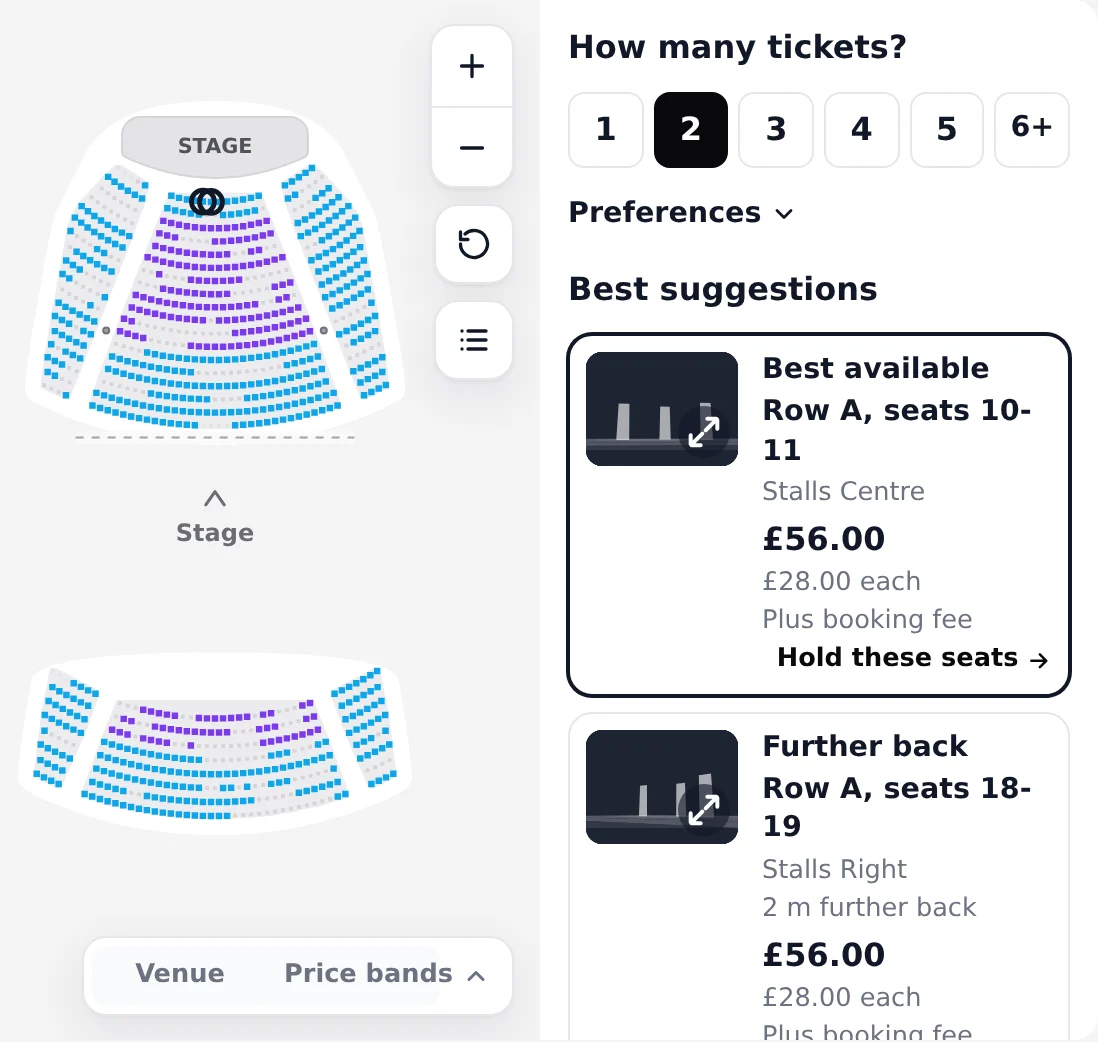
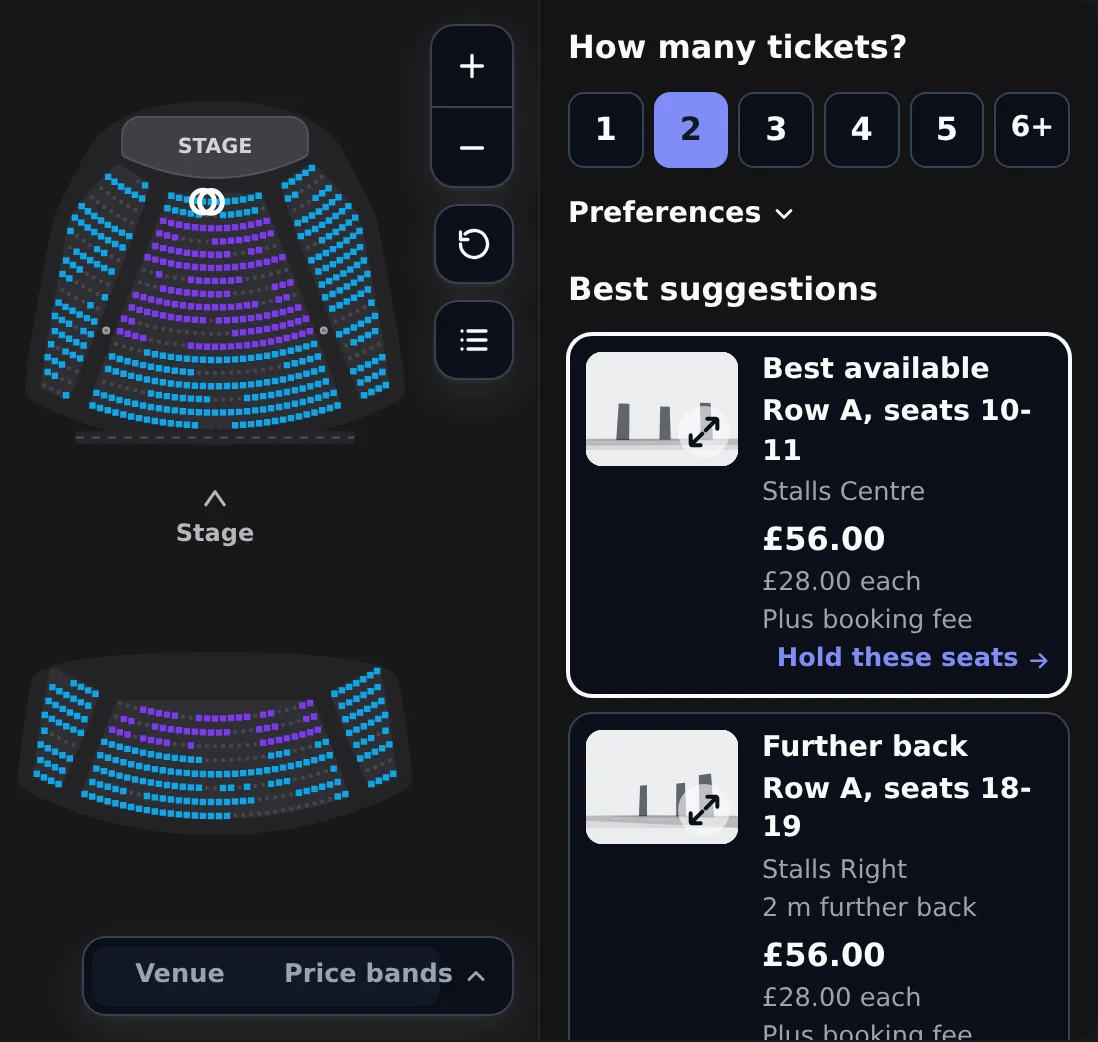
Here is the seat explorer beside best available on a demo night. Change how many tickets and the suggestions follow; hover one to ring its seats on the map.
Before you start#
- A venue plan with a published version. Rank a published version: a draft's seat numbers can still change, and nudges and locks name seats by number.
- Permission to update the venue, to save a draft ranking. Signing it off takes permission to manage the venue (
venues.manage), so the venue signs off its own house. - For the preview and the simulator, an event that sells from that version, with at least one date. Make a basic seating map has both.
Open the Ranking tab#
- Open Venues, choose the venue and open its Seating plans tab.
- Open the version, and choose Ranking in the inspector on the right.
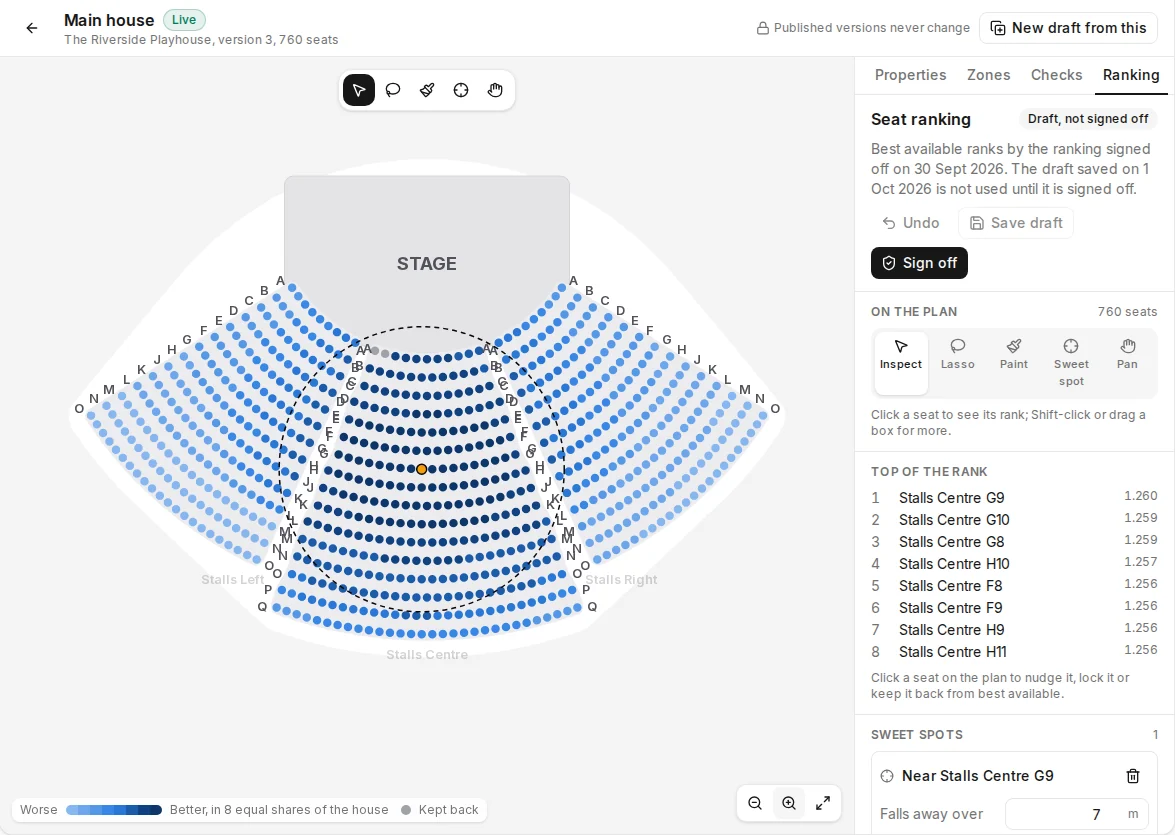
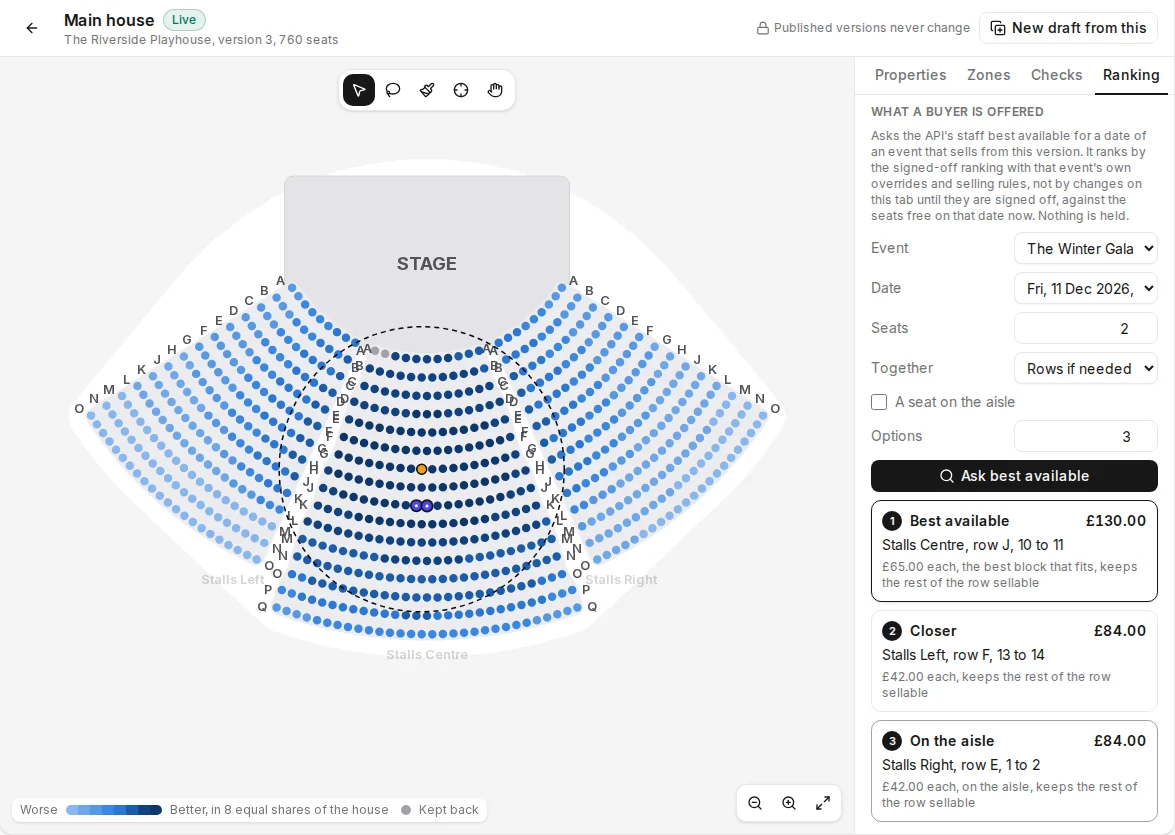
The plan is shaded by quality in eight bands of one colour, each an equal share of the house: pale is worse, dark is better, and a seat kept back from best available is grey. Top of the rank lists the eight best seats, each with its quality.
Shape the ranking#
Choose a tool under On the plan, or on the canvas toolbar:
| Tool | What it does |
|---|---|
| Inspect | Click a seat to see its rank and adjust it. Shift-click, or drag a box, for more seats. |
| Lasso | Draw round seats to pick them. |
| Paint | Drag over seats with a brush: Raise or Lower them by a number of quality points (0.1 to start with), Sell first, or Erase the paint. |
| Sweet spot | Click the seat with the best view. Seats near it rate higher, falling away with distance. |
| Pan | Drag to move round the plan; scroll to zoom. |
Seats painted Sell first are offered before every other seat, whatever their score. Use it for the seats a venue wants gone first, and Lower for the ones it would rather sell last.
Further down the panel:
- Sweet spots: each one with Falls away over, in metres (6 to start with), and its Strength. Remove one with its bin.
- Favour rows: choose a Section or area, the rows From and To, counted from the front of each section, and an Adjustment, then Add. The adjustment fades out over two rows either side.
- Section weights: 1 is the section as drawn; more lifts every seat in it, less lowers them.
- The geometry: the Geometry weight, how much the plan's own distances count, and the Tier of unpainted seats.
Adjust single seats#
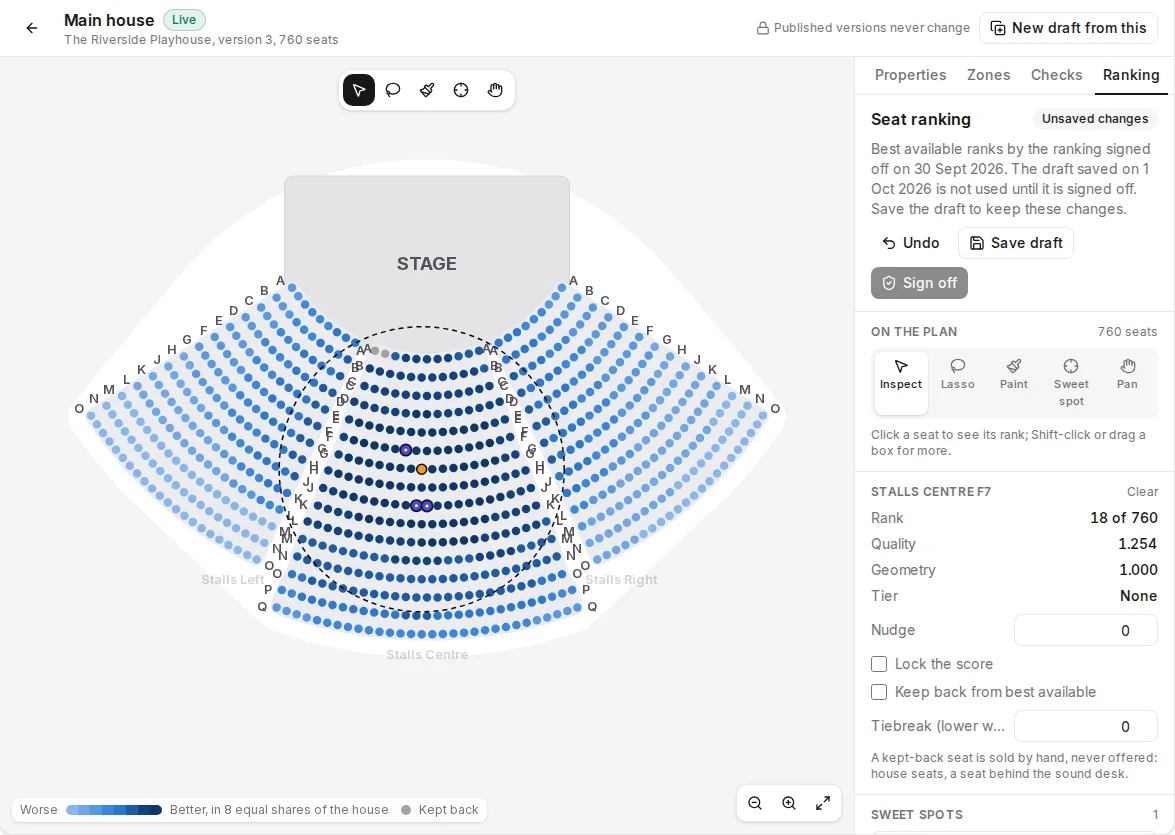
Click a seat with Inspect. The panel shows its Rank (such as 18 of 760), its Quality, the Geometry it started from and its Tier. Then:
- Nudge raises or lowers it by a little, from -1 to 1.
- Lock the score fixes its quality at Locked at, whatever else changes round it.
- Keep back from best available takes it out of every suggestion. A kept-back seat is sold by hand, never offered: house seats, a seat behind the sound desk.
- Tiebreak settles two seats of equal quality: lower wins.
With several seats picked, a setting that differs between them says mixed; changing it sets it on all of them.
Save and sign off#
- Select Save draft. The badge at the top says Unsaved changes until you do, then Draft, not signed off. Undo steps back through your changes.
- When the draft is right, select Sign off. This takes permission to manage the venue. The badge says Signed off, with the date.
Best available uses only what is signed off. Until a draft is signed off, it ranks by the ranking signed off before, or, with none, by the plan's geometry. Sign-off applies to every event that sells from this version.
Preview what a buyer is offered#
What a buyer is offered, at the foot of the Ranking tab, asks best available for real on a date of an event that sells from this version.
- Choose the Event and the Date.
- Set how many Seats, how they sit Together (In one row, Rows if needed or Anywhere), whether to ask for A seat on the aisle, and how many Options.
- Select Ask best available.
The options appear with their seats, price and why they were chosen, and the first is ringed on the plan; select another to ring it. The preview ranks by the signed-off ranking and that event's selling rules, against the seats free on the date now. Nothing is held. With no event selling from the version yet, the tab says so and previews nothing.
Set the event's selling rules#
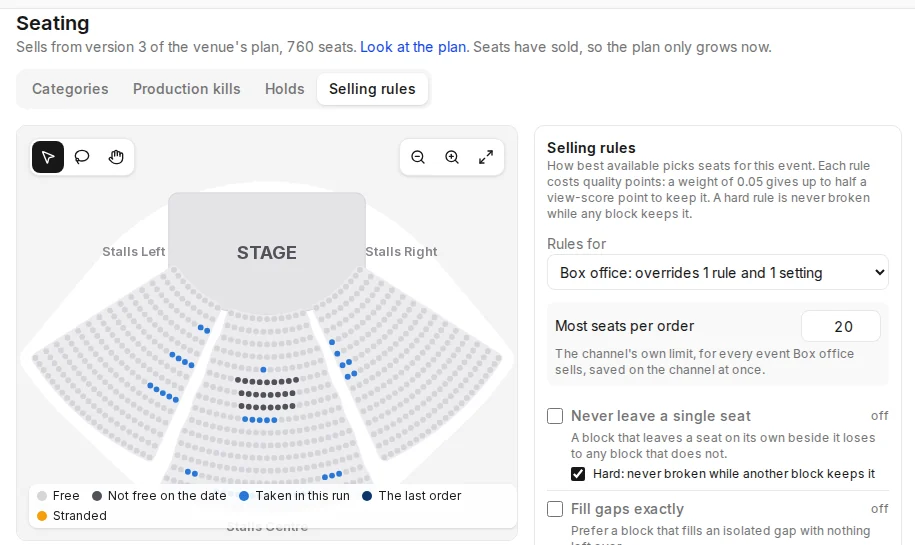
Selling rules are how best available sells this event. Each rule costs a block quality points when it breaks the rule: a weight of 0.05 gives up to half a view-score point to keep it. A hard rule is never broken while any block keeps it.
- Open Events, choose the event, open Seating and then Selling rules.
- In Rules for, choose Every channel for the event's default, or a channel to override the default there. A channel that differs says how, such as "overrides 1 rule and 1 setting", and every rule set on it says Set here.
- Turn rules on or off, and drag a rule's weight.
- Select Save rules. Best available sells the event by them from then on.
| Rule | What it prefers | To start with |
|---|---|---|
| Never leave a single seat | A block that leaves no seat on its own beside it | On, hard |
| Fill gaps exactly | A block that fills an isolated gap with nothing left over | On |
| Keep the rest sellable | Blocks that leave the rest of the row easy to sell, weighted by how often parties of each size buy | On |
| Keep long premium runs for big parties | Small parties off long runs in the best share of the house | On |
| Fill order | Among near equals, seats near the centre line (Centre out) or nearer the front (Front to back) | On, centre out |
| Balance sections | Sections that have sold less than the house as a whole | On |
| Spread concurrent buyers | Seats not offered to someone else in the last 45 seconds | On |
The settings the rules read holds the numbers behind them: Options shown, the Smallest gap left (2 means never leave a single seat), what counts as a Large party and a Long run, the Premium share of the house, the Most rows a party splits across (1 never splits a party), the Cost of splitting and the Spread between equals. A box office channel shows five options to start with, a website three.
Best-first only turns off every rule but spreading concurrent buyers, so seats sell strictly best first. Default rules, or As the event's default on a channel, takes the overrides off.
Most seats per order#
With a channel chosen in Rules for, Most seats per order is the most seats one order holds on that channel, from 1 to 50, and 10 unless you change it. It belongs to the channel, not the event: it is saved on the channel at once and applies to every event the channel sells.
Single seat gaps#
Never leave a single seat decides what best available suggests. A buyer who taps seats themselves is held to the same idea: a choice that leaves one empty seat between two taken seats, or against the end of a row or an aisle, is refused, with the same number of seats shifted along to take instead. Online that cannot be overridden. At a box office, staff can go ahead once the customer agrees: Sell seats in Box Office shows it. Box office and internal channels allow that confirm to start with, and every other channel does not. Change it with Single seat gap, under Seated selling on the channel's Overview in Sales channels, beside Most seats per order: Warn and offer other seats refuses the choice and offers the shifted seats, and Warn, and let staff confirm lets box office staff go ahead. The Event's Selling rules page shows the same control for the channel chosen in Rules for.
Play an on-sale#
The On-sale simulator, under the plan on Selling rules, plays a stream of orders against one date and shows how the house fills.
- Save the rules first: the simulator plays the saved rules, and says so when there are unsaved changes.
- Choose the Date, the Channel and how many Orders.
- Select Run on-sale.
Each order is a party size drawn from a typical mix (most often two, then four, then one), one in four asking for one area and one in ten for an aisle seat. Each is one request to best available, and each buyer takes the first option offered. Nothing is reserved or sold: the simulator keeps its own list of the seats it has taken. A run goes on to a full house, or stops when a dozen orders in a row find nothing that fits what is left.
The plan marks the seats the run took and the last order, and anything stranded. Beside it are the stranded seats, the share of the free seats taken, the seats still free by the size of the gap they sit in, and a chart of stranded seats as the house sells, next to The run before, so you can change a rule, save, run again and compare.
What buyers see#
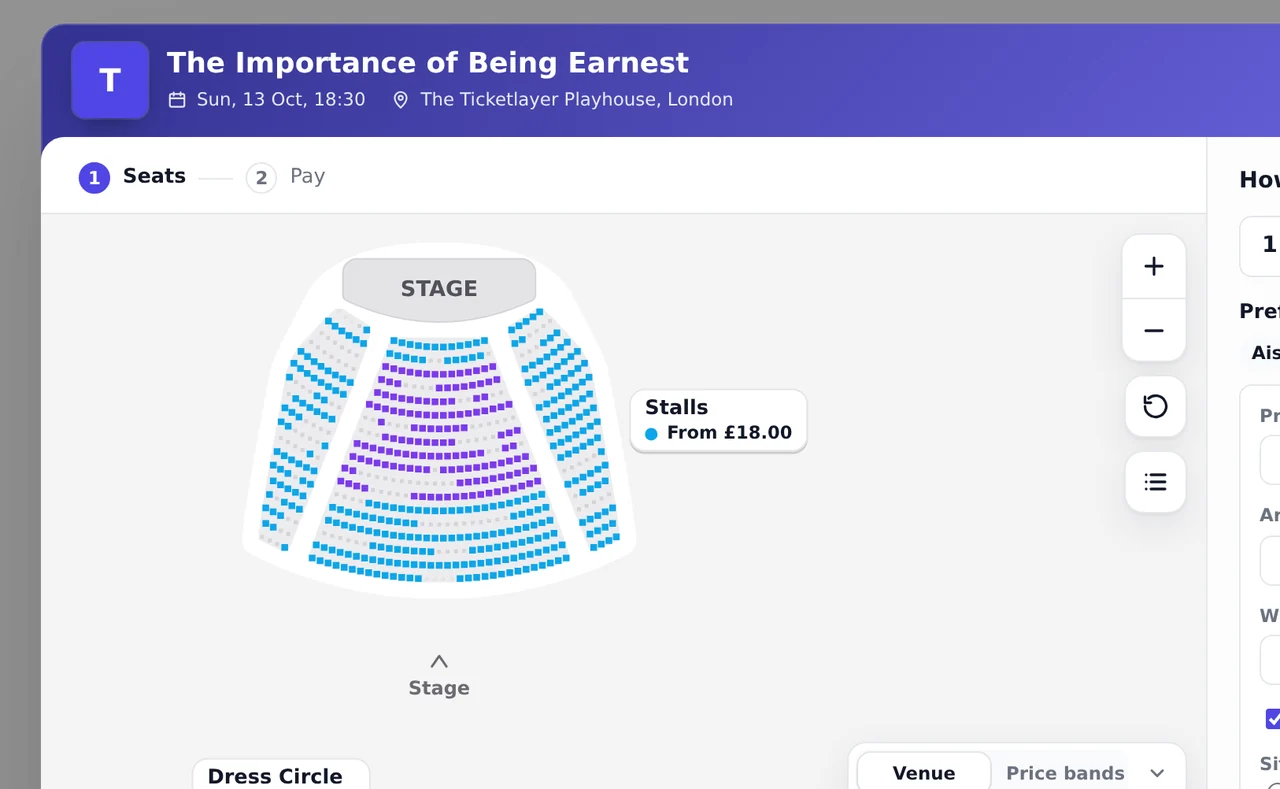
On your website, the buy modal's Seats step and <tl-best-available> show How many tickets? (<tl-quantity-picker>) and Best suggestions, with preferences in <tl-seat-preferences>. Each suggestion names what it is (Best available, Best value, Closer to the stage, Further back, Aisle seats, In the an area), the row and seats, the section, the price each and in all, and why, in words such as "2 m further back" or "Fills a gap exactly". Hovering a suggestion rings its seats on the map, its picture opens the view from the seats, and Hold these seats puts them in the cart on their category's standard ticket type.
Preferences narrow the search: Price per ticket, Area, Wheelchair spaces, An aisle seat, and Sitting together: all in one row, in one row or rows one behind the other, or near each other.
A seat's rank and quality are never shown, to buyers or to staff at the counter: a suggestion says what it is and why, never its score. At a box office, best available shows one suggestion at a time, with Next best.