Sell seats in Box Office
Sell a seated date at the counter: say how many on the keypad and take the best seats, or tap seats on the map, check the seat lines in the sale, and sell a held seat or a single seat gap after a confirm.
A seated date sells from the seat map. Box Office shows the same map buyers see online, with what only staff need on it: every hold by name, comps, seats in other sales and killed seats.
Steps#
Choose the event and the date
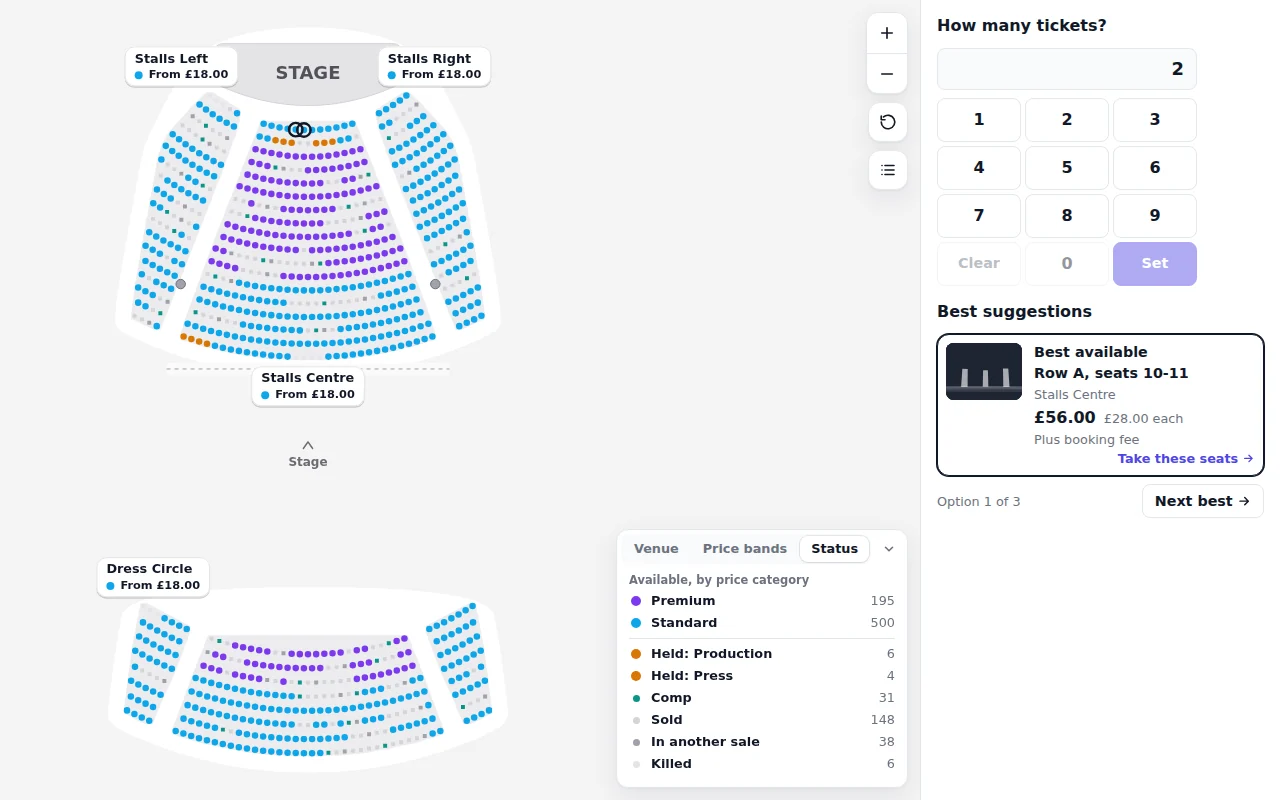
Start a new sale and choose the event, then the date. A seated date opens on the seat map, with How many tickets? beside it and the sale on the right. The map shows the venue, and Best suggestions shows the best seats for two.
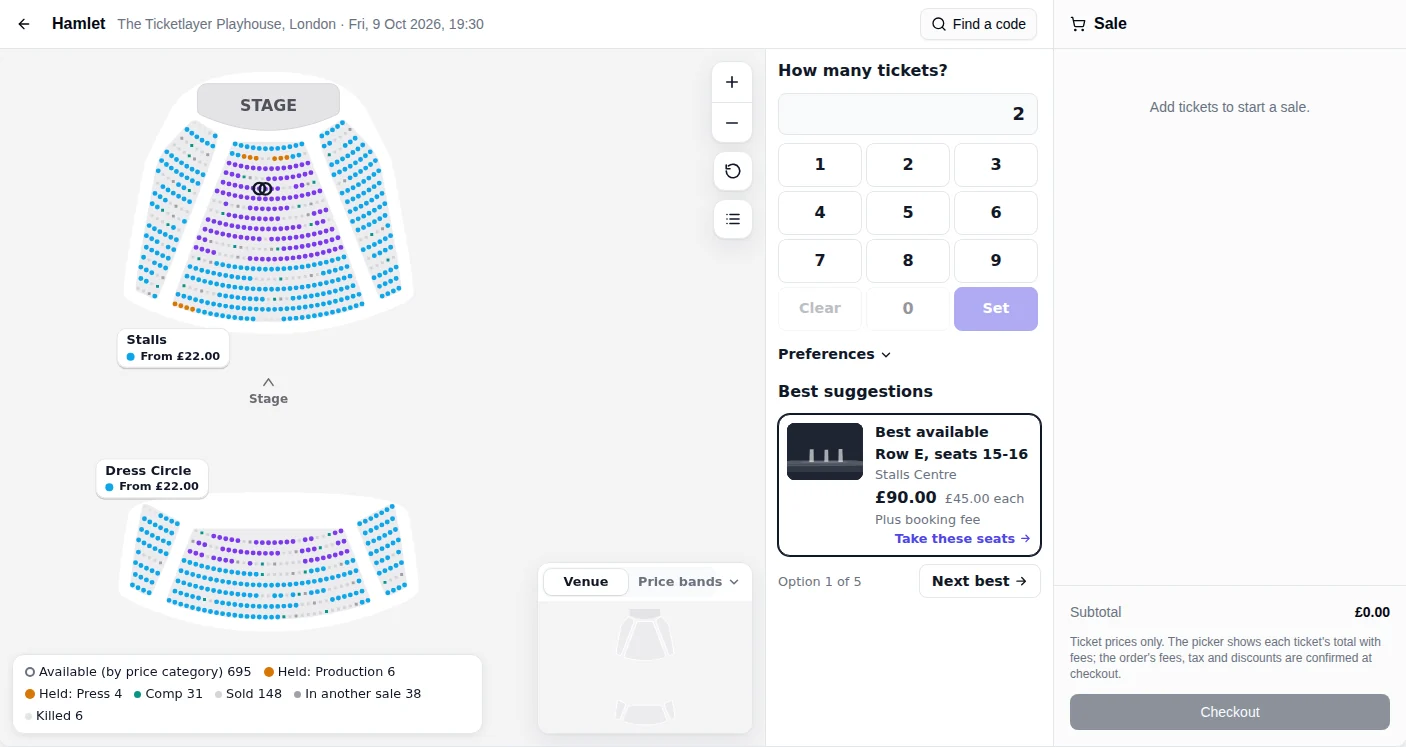
A seated date in Box Office: the map, the keypad and the best seats for two. Say how many, then take the best seats
Type how many on the keypad and press Set. Best suggestions shows one option at a time, with the row, the seats, the section and the price. Press Next best to see the next one; Option 1 of 5 says where you are. Open Preferences to ask for a price, an area, wheelchair spaces or an aisle seat.
When the customer is happy, press Take these seats. The seats join the sale on the right, one line each.
Or tap the seats the customer points at
Tap a section to go into it, then tap a seat. Tap it again to give it back. All sections goes back out. The list button beside the map shows each section's seats in rows, which is quicker for a customer who knows their row and number. The card beside the seat says In this sale, with the ticket types to choose from.
Check each seat in the sale
Every seat is its own line, with its row, seat, section and price category. Change the ticket type, such as Adult or Concession, on the line itself; the seat stays the customer's. The bin takes the seat out of the sale.
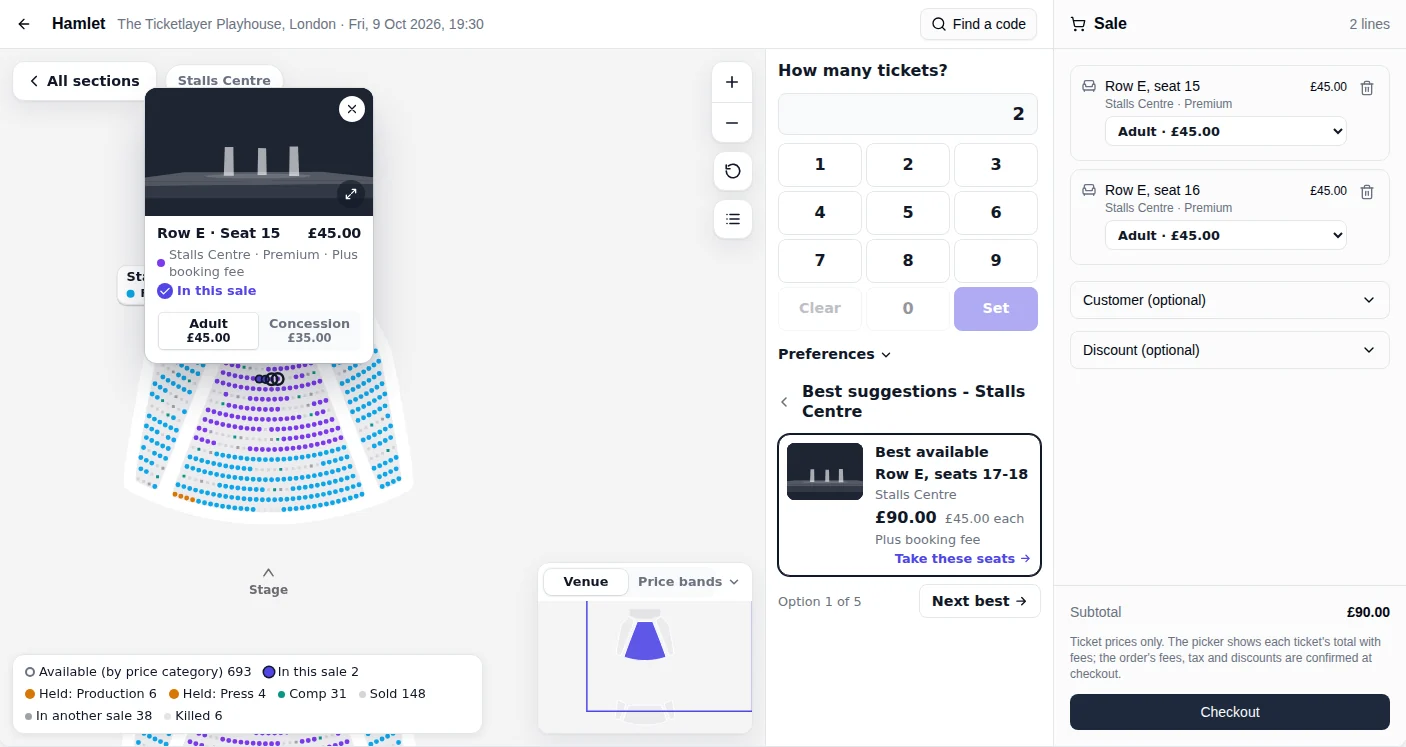
Seats in the sale: one line per seat, each with its ticket type. If Box Office says the seats leave a single empty seat
Box Office warns when a choice would leave one seat on its own: "That leaves a single empty seat. Sell anyway if the customer agrees, or take the seat that leaves no gap." Ask the customer. Press Sell anyway to go ahead, or Cancel and move the party along a seat. Online buyers cannot do this; only the box office can.
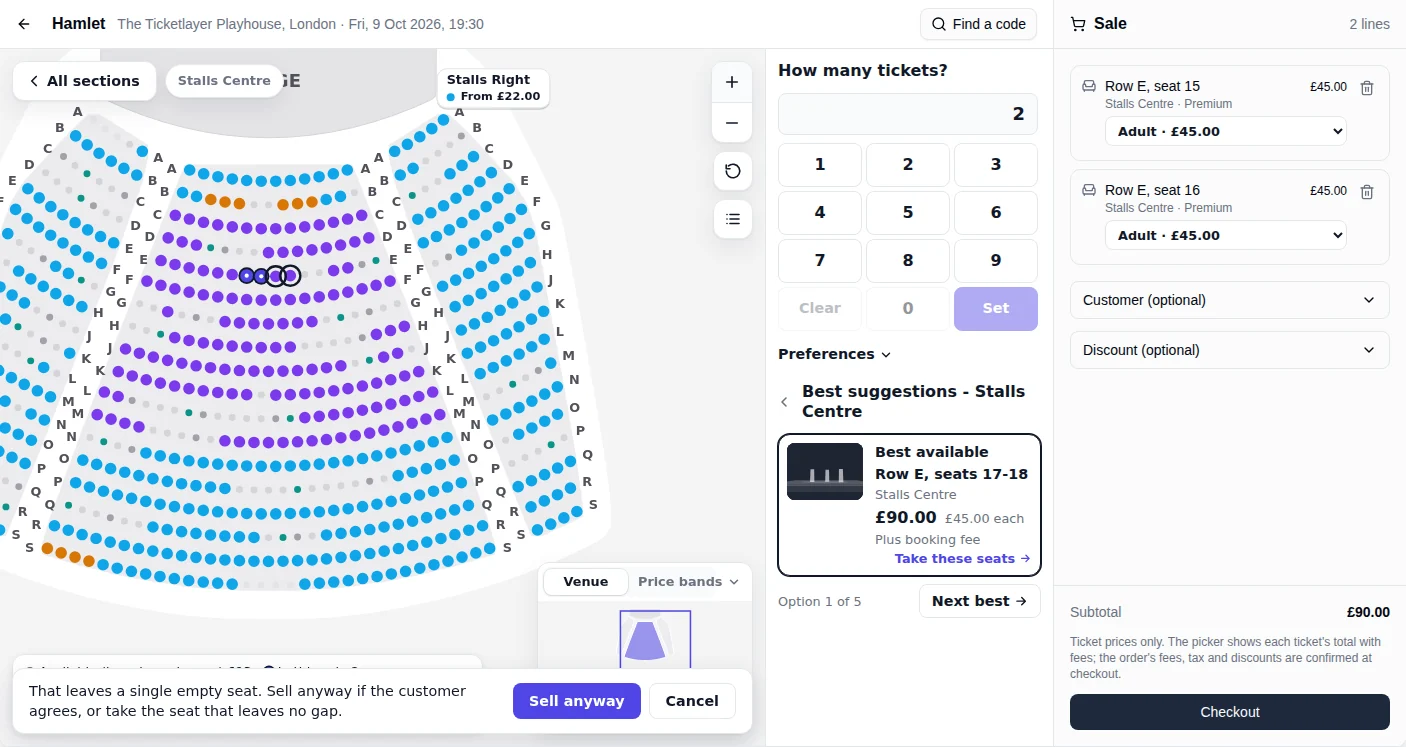
A single seat gap: sold only after the customer agrees. To sell a held seat, confirm it
A held seat says whose hold it is in, such as Held: Production. Tap it and Box Office asks, for example, "Row B, seat 9 is held for Production. Sell it?" Press Sell the held seat. The seat comes out of its hold and into the sale, and the release is recorded with your name. If the seat cannot be sold after all, it goes back into the same hold.
Only staff whose role lets them release holds can do this. For everyone else Box Office says the role cannot sell held seats: ask a manager.
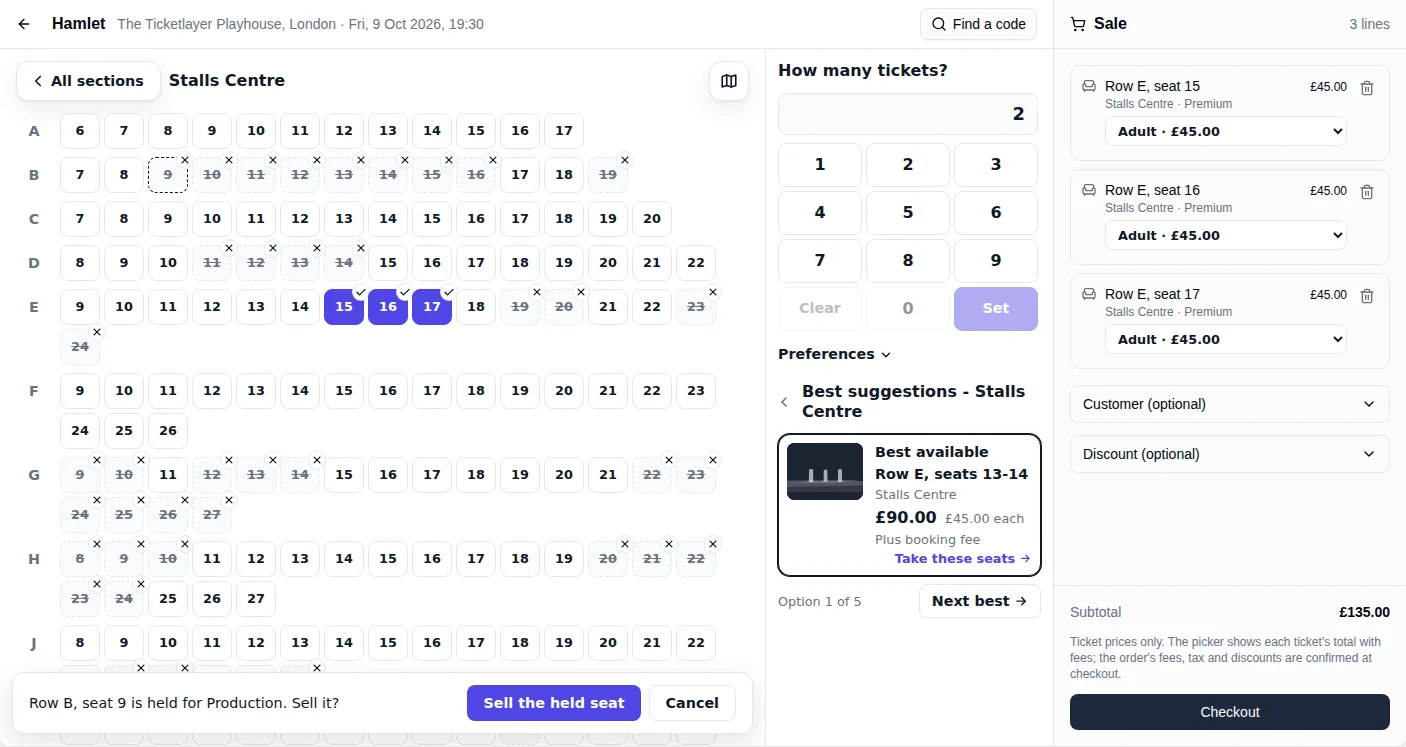
Selling a held seat: Box Office asks first. Take payment
Press Checkout under the sale and take payment as for any sale. The seats are the customer's once it is paid. The seats show as Sold on the map.
The customer's seats are sold, and every other till and the website see them go within a couple of seconds.
What the map shows#
Open the Status tab in the corner of the map to count every seat on the date by what it is: Available, by price category; In this sale; each hold by name, such as Held: Production or Held: Press; Comp; Sold; In another sale, which is a seat in another till's sale or a buyer's basket online; and Killed. A seat's state is drawn in shape as well as colour, so it reads without the colours too.
Allocations and released kills#
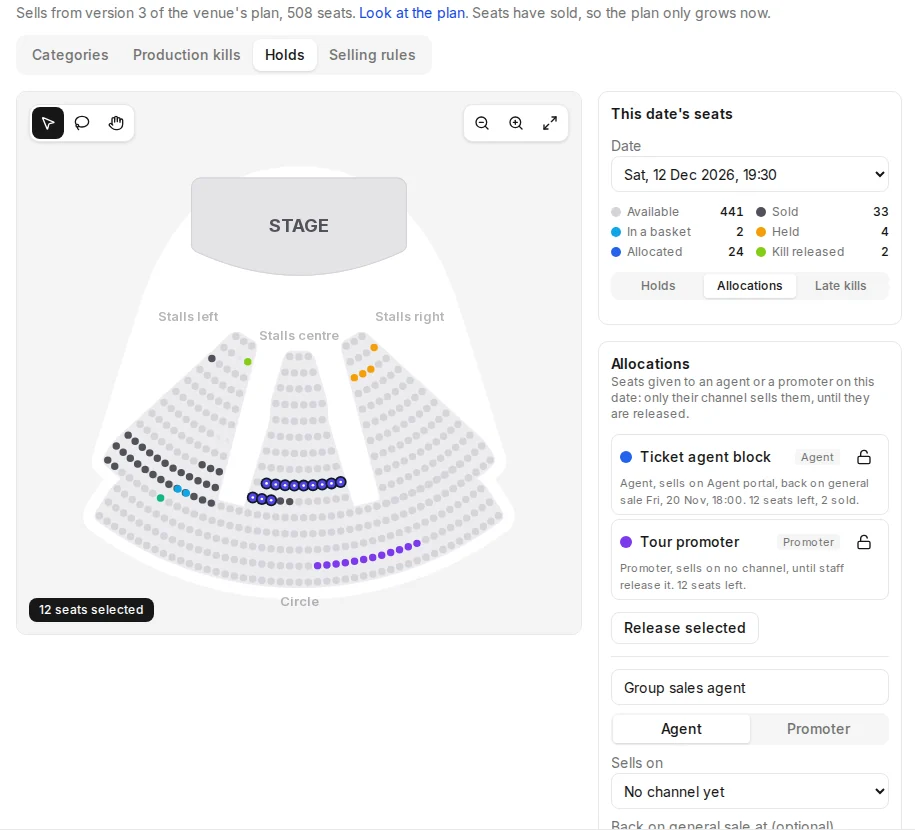
Both are set up in Backstage for one date at a time: under the event's Seating, open Holds, choose the date, then Allocations or Late kills.
- An allocation is seats given to an agent or a promoter, sold only on their channel until they are released, by hand or at a time set on the allocation. At a box office on that channel they are on sale like any seat; at any other till they are taken.
- A released kill is a seat the production killed for the whole run and put back on sale for this date only, such as a camera position not needed tonight. It sells like any other seat.
Still not working?#
- A seat has just goneSomeone else took it a moment earlier. Take the free seat Box Office offers nearby, or tap another.
- Your role cannot sell held seatsAsk a manager whose role can release holds to sell it, or to release the hold in Backstage.
- You can hold up to a number of seats in one orderThat is the most seats one order takes on this channel. Sell the rest as a second sale, or ask a manager to raise it in the event's Selling rules.
- No seats together fitTry fewer tickets or fewer preferences, or tap the seats on the map.
- The date shows ticket rows, not a mapThat date is not sold seated. A manager puts the event on a seating plan under its Seating in Backstage.
Call us#
Tell us which device and laptop you have and what the screen says. Include the request id if Box Office shows one.